Next.js
The Best Folder Structure for Next.js Projects in 2026
By Yahya Saeed · 4 min read · 152 views
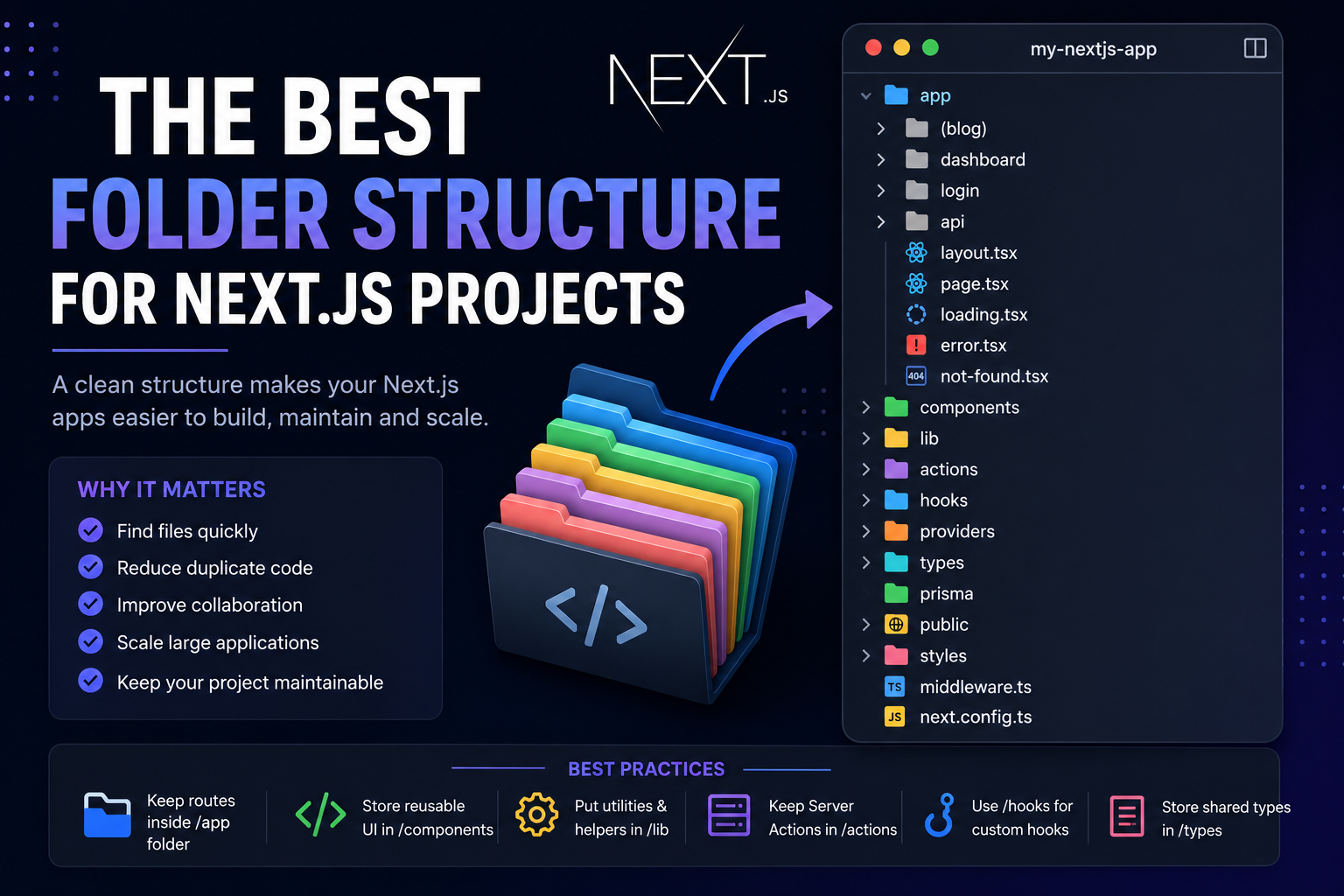
The Best Folder Structure for Next.js Projects in 2026
One of the first questions every Next.js developer asks is:
"Where should I put my files?"
While Next.js doesn't force a specific project structure, choosing a clean organization from the beginning can save countless hours as your application grows.
Whether you're building a personal portfolio, a blog, a SaaS platform, or an enterprise application, having a scalable folder structure makes development faster and your codebase much easier to understand.
Let's explore a modern folder structure that works well in 2026.
Why Folder Structure Matters
A good project structure helps you:
Find files quickly
Reduce duplicate code
Improve collaboration
Scale large applications
Keep your project maintainable
Many beginners throw everything into a few folders. That works for small projects but becomes difficult to manage as the application grows.
A Recommended Next.js Folder Structure:
app/
components/
lib/
actions/
hooks/
providers/
types/
prisma/
public/
styles/
middleware.ts
Each folder has a specific purpose.
The app Folder
The app directory is the heart of every modern Next.js application.
Example:
app/
│
├── blog/
├── dashboard/
├── login/
├── profile/
├── api/
├── layout.tsx
├── page.tsx
├── loading.tsx
├── error.tsx
└── not-found.tsx
This folder contains:
Routes
Layouts
Server Components
Route Groups
Loading pages
Error pages
Keep only route-related files inside app.
The components Folder
Store reusable UI components here.
Example:
components/
│
├── navbar.tsx
├── footer.tsx
├── sidebar.tsx
├── button.tsx
├── card.tsx
├── modal.tsx
└── newsletter.tsx
A good rule is:
If a component is used more than once, move it into the components folder.
The lib Folder
This is where your application's logic lives.
Example:
lib/
│
├── prisma.ts
├── auth.ts
├── cloudinary.ts
├── resend.ts
├── slug.ts
├── reading-time.ts
├── seo.ts
└── validation.ts
This folder usually contains:
Database connections
Helper functions
Utility methods
External service integrations
Authentication logic
The actions Folder
Next.js Server Actions deserve their own location.
Example:
actions/
│
├── auth.ts
├── posts.ts
├── comments.ts
├── newsletter.ts
└── users.ts
Keeping actions separate makes them easier to reuse across multiple pages.
The hooks Folder
Place custom React hooks here.
Example:
hooks/
│
├── useDarkMode.ts
├── useDebounce.ts
├── useScroll.ts
└── useClipboard.ts
This prevents hook logic from being duplicated across components.
The providers Folder
Applications often use multiple providers:
providers/
│
├── theme-provider.tsx
├── session-provider.tsx
└── query-provider.tsx
This keeps layout.tsx clean and organized.
The types Folder
Store shared TypeScript types.
Example:
types/
│
├── post.ts
├── user.ts
├── api.ts
└── database.ts
Using shared types improves consistency throughout the application.
The Prisma Folder
Prisma has its own dedicated folder:
prisma/
│
├── schema.prisma
├── seed.ts
└── migrations/
Avoid mixing database files with application code.
The Public Folder
Everything inside public is directly accessible.
Example:
public/
│
├── images/
├── icons/
├── favicon.ico
├── logo.png
└── robots.txt
Store only static assets here.
Organizing Large Features
Instead of creating hundreds of files inside one folder, organize features together.
Example:
app/
└── dashboard/
    ├── posts/
    ├── comments/
    ├── users/
    ├── analytics/
    └── settings/
This keeps related code close together.
Avoid These Common Mistakes
Putting Everything Inside app
The app folder should mainly contain routing.
Business logic belongs elsewhere.
Giant Components
Avoid components that are hundreds of lines long.
Break them into smaller reusable pieces.
Duplicating Helper Functions
If you copy the same function multiple times, move it into lib.
Mixing Client and Server Logic
Keep Server Components and Client Components separate whenever possible.
This improves performance and keeps your code easier to reason about.
Example Project Structure:
my-nextjs-app/

app/
components/
lib/
actions/
hooks/
providers/
types/
prisma/
public/
styles/

middleware.ts
next.config.ts
package.json
tsconfig.json
This structure works well for:
Blogs
Dashboards
SaaS applications
Admin panels
E-commerce stores
Portfolio websites
Tips for Scaling Your Project
As your project grows:
Use meaningful folder names.
Keep files small and focused.
Group related features together.
Create reusable UI components.
Move shared logic into utilities.
Avoid unnecessary nesting.
A clean structure today prevents major refactoring tomorrow.
Final Thoughts
There is no single "perfect" folder structure for every Next.js application.
The best structure is one that stays organized as your project grows.
By separating routes, components, utilities, hooks, server actions, and shared types, you'll create projects that are easier to maintain, easier to scale, and much more enjoyable to work on.
As modern web applications become larger and more feature-rich, investing time in a solid folder structure isn't just good practice—it's one of the smartest decisions you can make as a Next.js developer.
Keep reading
Related Posts

Programming
Vibe Coding vs Learning to Code: Which Path Will Take You Further?
AI can build apps faster than ever, leading to the rise of "vibe coding." But does that mean learning to code is no longer necessary? Let's explore the strengths, weaknesses, and future of both approaches to discover which path offers the greatest long-term value.
4 min read · 277 views

Next.js
Next.js 16 Features Every Developer Should Know in 2026
Next.js 16 continues to push modern web development forward with improved performance, better developer experience, enhanced routing, and powerful server-side capabilities. Whether you're building a blog, SaaS platform, portfolio, or enterprise application, these are the most important Next.js 16 features every developer should understand.
4 min read · 192 views

Next.js
How to Build a Blog with Next.js 16: Complete Beginner Guide
Learn how to create a modern blog with Next.js 16 using dynamic pages, categories, tags, excerpts, SEO metadata, and a scalable content structure.
3 min read · 140 views
Trending
Popular Posts
Productivity Tools That Save Developers Hours in 2026
681 views
The Most Valuable Skills to Learn in the AI Era (2026 and Beyond)
331 views
Vibe Coding vs Learning to Code: Which Path Will Take You Further?
277 views
Next.js 16 Features Every Developer Should Know in 2026
192 views
How to Build a Blog with Next.js 16: Complete Beginner Guide
140 views
Comments
No approved comments yet.