JavaScript
Promise vs Async/Await
By Yahya Saeed · 7 min read · 46 views
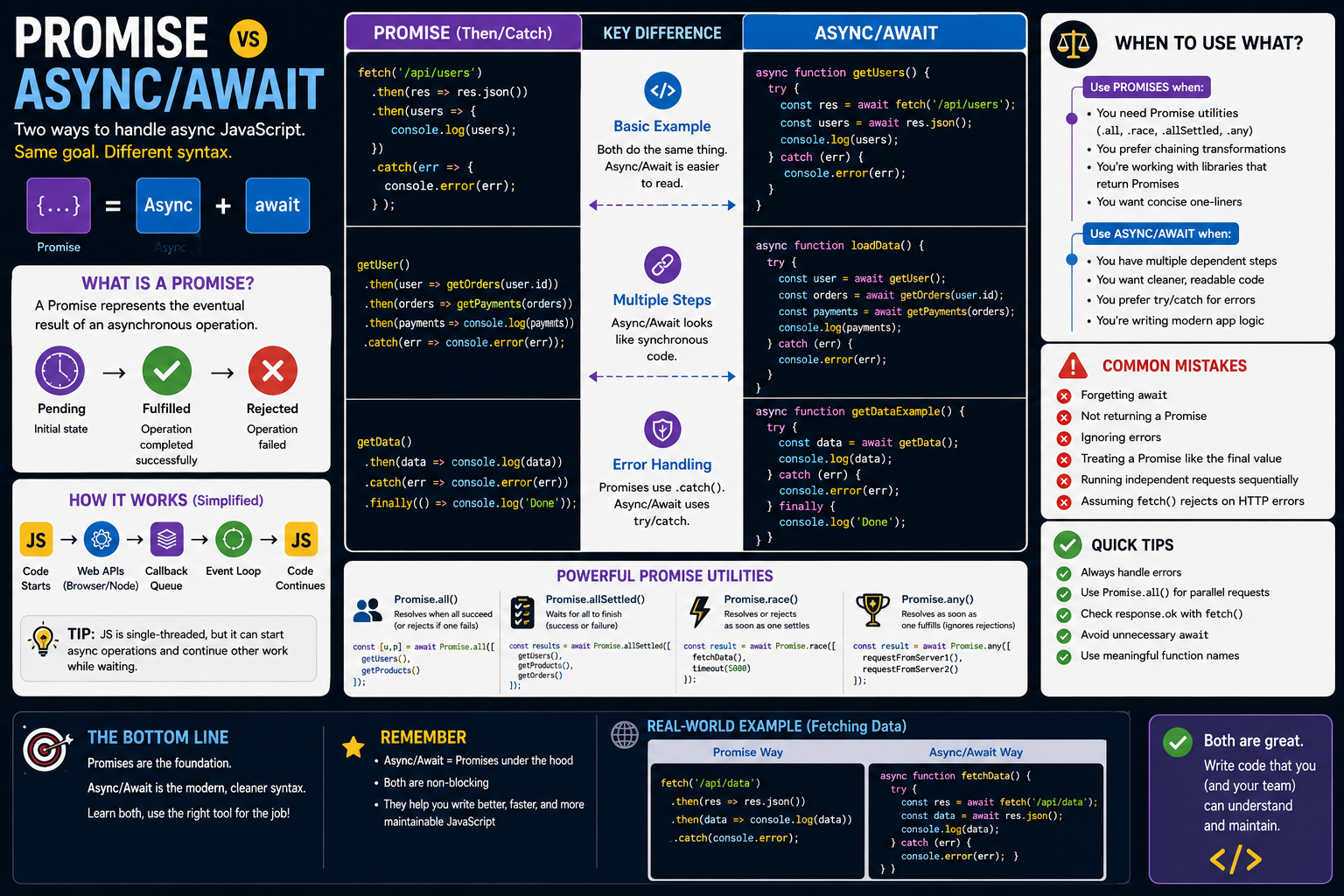
Promise vs Async/Await
If you've worked with modern JavaScript, you've probably encountered both Promises and async/await.
At first, they can seem like two completely different approaches to asynchronous programming.
They're not.
Async/await is built on top of Promises.
Understanding that relationship makes asynchronous JavaScript much easier to learn.
In this guide, we'll compare Promises and async/await, look at their differences, and explain when you should use each one.
What Is a Promise?
A Promise represents the eventual result of an asynchronous operation.
For example:
const promise = fetch("/api/users");The request doesn't immediately give you the final data.
Instead, fetch() returns a Promise that will eventually settle.
A Promise can have three states:
Pending
Fulfilled
Rejected
You can handle the result using .then().
fetch("/api/users")
  .then((response) => response.json())
  .then((users) => {
    console.log(users);
  });
If something goes wrong, use .catch():
fetch("/api/users")
  .then((response) => response.json())
  .then((users) => {
    console.log(users);
  })
  .catch((error) => {
    console.error(error);
  });
What Is Async/Await?
Async/await provides a cleaner way to work with Promises.
Instead of chaining .then() calls, you can write:
async function getUsers() {
  const response = await fetch("/api/users");

  const users = await response.json();

  console.log(users);
}
This code still uses Promises.
The difference is the syntax used to consume them.
The Most Important Difference
Think of it this way:
Promise syntax:
fetch("/api/users")
  .then((response) => response.json())
  .then((users) => {
    console.log(users);
  });
Async/await syntax:
async function getUsers() {
  const response = await fetch("/api/users");

  const users = await response.json();

  console.log(users);
}
Both approaches work with Promises.
Async/await simply makes many asynchronous workflows easier to read.
Async/Await Doesn't Replace Promises
This is one of the most important things to understand.
When you write:
const users = await getUsers();getUsers() still returns a Promise.
await simply tells the async function to pause at that point until the Promise settles.
So:
Promises are the underlying mechanism.
Async/await is a convenient syntax for working with them.
Promise Chaining
Promises are particularly useful when you need to chain operations.
For example:
getUser()
  .then((user) => getOrders(user.id))
  .then((orders) => getPayments(orders))
  .then((payments) => {
    console.log(payments);
  })
  .catch((error) => {
    console.error(error);
  });
Each .then() receives the result from the previous operation.
The Same Code With Async/Await
The previous example can be written as:
async function loadData() {
  try {
    const user = await getUser();

    const orders = await getOrders(user.id);

    const payments = await getPayments(orders);

    console.log(payments);
  } catch (error) {
    console.error(error);
  }
}
For many developers, this version is easier to follow.
The operations look like normal sequential code.
Error Handling With Promises
Promises commonly use .catch():
getUsers()
  .then((users) => {
    console.log(users);
  })
  .catch((error) => {
    console.error(error);
  });
You can also use .finally():
getUsers()
  .then((users) => {
    console.log(users);
  })
  .catch((error) => {
    console.error(error);
  })
  .finally(() => {
    console.log("Request finished");
  });
Error Handling With Async/Await
Async/await commonly uses try...catch:
async function loadUsers() {
  try {
    const users = await getUsers();

    console.log(users);
  } catch (error) {
    console.error(error);
  } finally {
    console.log("Request finished");
  }
}
This can make more complicated error-handling logic easier to organize.
Which One Is Easier to Read?
For simple operations, both are readable.
Promise version:
getUser()
  .then((user) => getOrders(user.id))
  .then((orders) => console.log(orders));
Async/await version:
const user = await getUser();

const orders = await getOrders(user.id);

console.log(orders);
Many developers find async/await easier to understand, especially when an application contains several dependent asynchronous operations.
Running Operations in Parallel
One common mistake with async/await is accidentally making independent operations run sequentially.
For example:
const users = await getUsers();

const products = await getProducts();
If these requests don't depend on each other, the second request doesn't need to wait for the first.
Use Promise.all():
const [users, products] = await Promise.all([
  getUsers(),
  getProducts(),
]);
This allows the independent operations to run concurrently.
Promise.all()
Promise.all() is one of the most useful Promise utilities.
const results = await Promise.all([
  getUsers(),
  getProducts(),
  getOrders(),
]);
If all operations succeed, you receive their results.
If one rejects, the combined Promise rejects.
Promise.allSettled()
Sometimes you want every operation to finish even if some fail.
Use:
const results = await Promise.allSettled([
  getUsers(),
  getProducts(),
  getOrders(),
]);
The result tells you which operations succeeded and which failed.
This is useful when individual failures shouldn't cancel the entire operation.
Promise.race()
Promise.race() returns when the first Promise settles.
const result = await Promise.race([
  fetchData(),
  timeout(),
]);
This can be useful for implementing time limits.
Promise.any()
Promise.any() waits for the first Promise that successfully fulfills.
const result = await Promise.any([
  requestFromServerOne(),
  requestFromServerTwo(),
  requestFromServerThree(),
]);
This can be useful when multiple sources can provide the same information and you only need one successful response.
When Promises Can Be Better
Async/await isn't always automatically better.
Promise chains can be useful when you want to express a simple sequence of transformations:
fetch("/api/users")
  .then((response) => response.json())
  .then((users) => users.filter((user) => user.active))
  .then((users) => users.map((user) => user.name));
The flow is concise and easy to follow.
Promises are also important when using utilities such as:
Promise.all()
Promise.allSettled()
Promise.race()
Promise.any()
So you should learn Promises even if you primarily write async/await.
When Async/Await Is Better
Async/await is especially useful when you have multiple dependent operations.
For example:
async function createOrder() {
  const user = await getUser();

  const cart = await getCart(user.id);

  const total = calculateTotal(cart);

  const order = await createOrderRecord(user.id, total);

  return order;
}
The code reads naturally from top to bottom.
This can be much easier to maintain than deeply chained .then() calls.
Don't Forget That Async Functions Return Promises
Consider:
async function getName() {
  return "John";
}
Even though the function appears to return a string, it actually returns a Promise.
You can use:
getName().then((name) => {
  console.log(name);
});
Or:
const name = await getName();This is an important concept for understanding async/await.
You Can Mix Promises and Async/Await
You don't have to choose one exclusively.
For example:
async function loadUsers() {
  const response = await fetch("/api/users");

  return response.json();
}
Here, response.json() returns a Promise.
The function uses async/await while still returning a Promise to its caller.
Mixing the two isn't necessarily a problem.
The important thing is to keep the code understandable.
Avoid Unnecessary Await
Consider:
async function getUsers() {
  return await fetchUsers();
}
If you don't need to do anything with the result inside the function, you can often write:
async function getUsers() {
  return fetchUsers();
}
However, await can be useful when you need local error handling or need to process the result before returning it.
Don't Await Independent Operations Sequentially
Avoid this when the operations are independent:
const profile = await getProfile();

const settings = await getSettings();

const notifications = await getNotifications();
Prefer:
const [profile, settings, notifications] = await Promise.all([
  getProfile(),
  getSettings(),
  getNotifications(),
]);
This is one of the most important performance improvements you can make when working with asynchronous operations.
Don't Forget HTTP Error Handling
When using fetch(), a response with an HTTP error status doesn't automatically cause the Promise to reject.
For example:
const response = await fetch("/api/users");You should check:
if (!response.ok) {
  throw new Error("Failed to fetch users");
}
A complete example:
async function getUsers() {
  const response = await fetch("/api/users");

  if (!response.ok) {
    throw new Error("Failed to fetch users");
  }

  return response.json();
}
This is an important habit for production applications.
Common Beginner Mistakes
When learning Promises and async/await, developers commonly:
Forget to use
awaitForget to return a Promise
Treat a Promise like its final value
Forget error handling
Run independent requests sequentially
Create unnecessary Promise chains
Assume
fetch()rejects on every HTTP errorUse
awaiteverywhere without considering concurrency
Understanding these mistakes will save you a lot of debugging time.
Promise vs Async/Await: The Big Picture
The relationship is simple.
Promise:
fetch("/api/data")
  .then((response) => response.json())
  .then((data) => {
    console.log(data);
  });
Async/Await:
async function loadData() {
  const response = await fetch("/api/data");

  const data = await response.json();

  console.log(data);
}
Both are valid.
Both use Promises.
Async/await provides a different way to write Promise-based code.
Which One Should You Learn?
Learn both.
You should understand how Promises work because async/await depends on them.
For everyday application code, async/await is often the most readable option.
But Promise methods and utilities remain essential.
A good JavaScript developer should be comfortable with:
.then()
.catch()
.finally()
as well as:
async
await
try
catch
And you should know:
Promise.all()
Promise.allSettled()
Promise.race()
Promise.any()
A Practical Rule
Here's a simple rule you can remember:
Use async/await for readable sequential workflows.
Use Promise utilities when you need concurrency or more advanced Promise behavior.
You don't need to treat them as competing technologies.
They're two ways of working with the same asynchronous foundation.
Final Thoughts
Promises and async/await aren't really competitors.
Promises are the foundation of modern asynchronous JavaScript, while async/await provides cleaner syntax for consuming them.
If you're building modern applications with React, Next.js, Node.js, or browser APIs, you'll use both.
Start by understanding what a Promise is.
Then learn .then(), .catch(), and .finally().
After that, learn async and await.
Finally, become comfortable with Promise.all(), Promise.allSettled(), Promise.race(), and Promise.any().
Once these concepts become familiar, asynchronous JavaScript becomes much less intimidating and you'll be able to write code that's both cleaner and more efficient.
Keep reading
Related Posts

Career & Technology
The Most Valuable Skills to Learn in the AI Era (2026 and Beyond)
Artificial Intelligence is changing how we work, learn, and build products. Some skills are becoming less valuable, while others are becoming more important than ever. If you want to stay relevant and thrive in 2026 and beyond, these are the skills you should focus on developing.
4 min read · 330 views

Programming
Vibe Coding vs Learning to Code: Which Path Will Take You Further?
AI can build apps faster than ever, leading to the rise of "vibe coding." But does that mean learning to code is no longer necessary? Let's explore the strengths, weaknesses, and future of both approaches to discover which path offers the greatest long-term value.
4 min read · 276 views

Next.js
Next.js 16 Features Every Developer Should Know in 2026
Next.js 16 continues to push modern web development forward with improved performance, better developer experience, enhanced routing, and powerful server-side capabilities. Whether you're building a blog, SaaS platform, portfolio, or enterprise application, these are the most important Next.js 16 features every developer should understand.
4 min read · 191 views
Trending
Popular Posts
Productivity Tools That Save Developers Hours in 2026
680 views
The Most Valuable Skills to Learn in the AI Era (2026 and Beyond)
330 views
Vibe Coding vs Learning to Code: Which Path Will Take You Further?
276 views
Next.js 16 Features Every Developer Should Know in 2026
191 views
The Best Folder Structure for Next.js Projects in 2026
151 views
Comments
No approved comments yet.