JavaScript
JavaScript Features Every Developer Should Know
By Yahya Saeed · 5 min read · 78 views
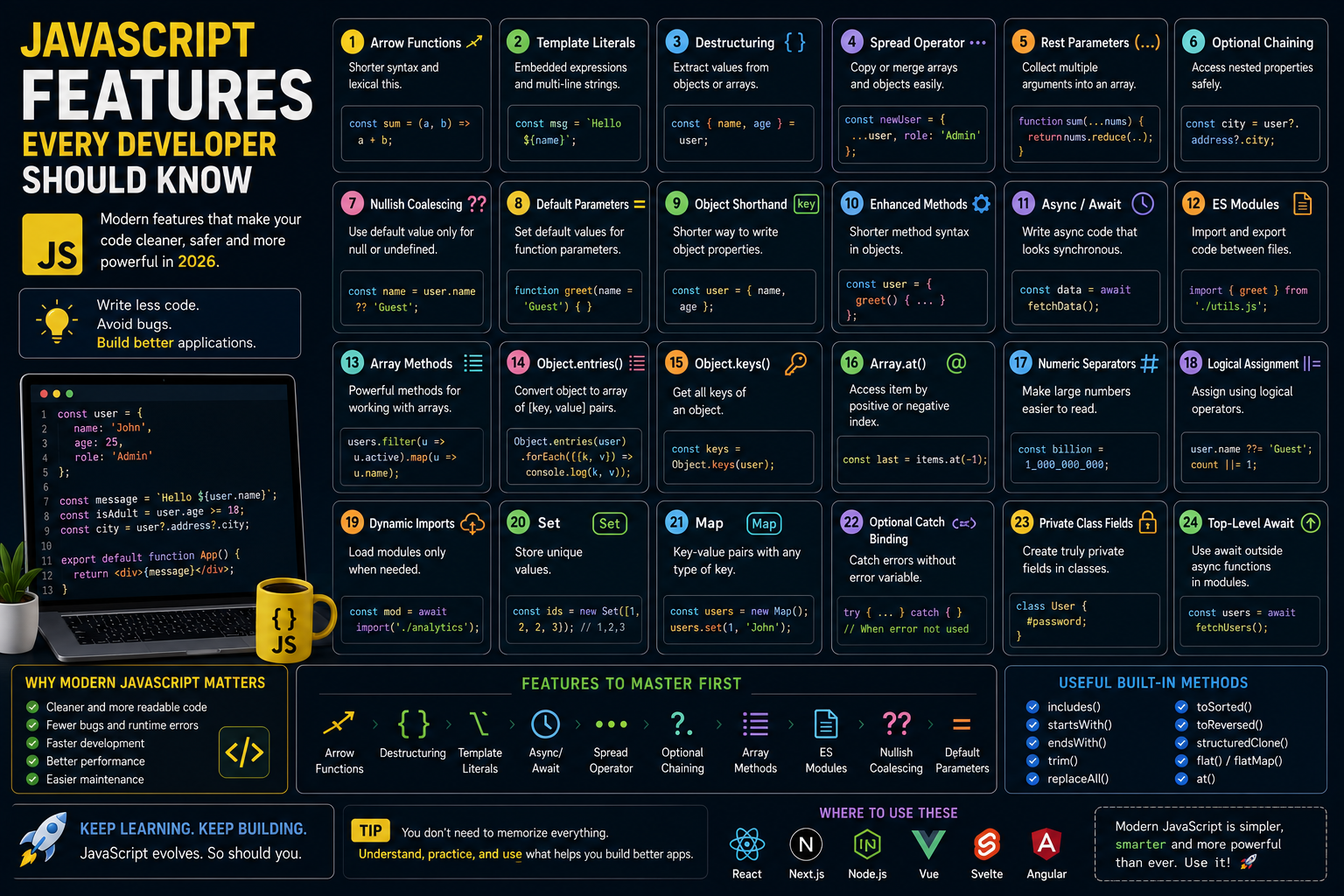
JavaScript Features Every Developer Should Know
JavaScript has changed dramatically over the past decade.
What was once considered a simple scripting language now powers modern websites, mobile applications, desktop software, servers, cloud functions, and even AI tools.
Every year, new JavaScript features make development cleaner, safer, and more productive.
The problem is that many developers still write JavaScript as if it were 2015.
Learning modern JavaScript isn't about memorizing syntax.
It's about writing code that's easier to read, easier to maintain, and less prone to bugs.
Here are the JavaScript features every developer should know in 2026.
Arrow Functions
Arrow functions provide a shorter syntax for writing functions.
Instead of:
function greet(name) {
  return `Hello ${name}`;
}
You can write:
const greet = (name) => `Hello ${name}`;Arrow functions also handle this differently, making them especially useful in React and event callbacks.
Use them whenever a traditional function isn't required.
Template Literals
String concatenation is no longer necessary.
Instead of:
const message = "Hello " + name;Use template literals:
const message = `Hello ${name}`;They also support multi-line strings without extra characters.
Template literals improve readability and reduce mistakes.
Destructuring
Destructuring allows you to extract values from objects and arrays.
Example:
const user = {
  name: "John",
  age: 25,
};

const { name, age } = user;
Array example:
const colors = ["Red", "Green", "Blue"];

const [first, second] = colors;
Destructuring reduces repetitive code.
Spread Operator
The spread operator makes copying and combining data simple.
Arrays:
const numbers = [1, 2, 3];

const updated = [...numbers, 4];
Objects:
const user = {
  name: "John",
};

const updatedUser = {
  ...user,
  role: "Admin",
};
It is one of the most frequently used JavaScript features in React applications.
Rest Parameters
Rest parameters collect multiple arguments into an array.
Example:
function sum(...numbers) {
  return numbers.reduce((a, b) => a + b, 0);
}
This is cleaner than using the older arguments object.
Optional Chaining
Optional chaining prevents errors when accessing nested properties.
Without it:
user.profile.address.cityIf profile doesn't exist, JavaScript throws an error.
Instead:
user?.profile?.address?.cityIf any property is missing, the expression safely returns undefined.
This feature dramatically reduces runtime errors.
Nullish Coalescing
Sometimes || gives unexpected results.
Instead use:
const username = user.name ?? "Guest";The default value is only used when the value is null or undefined.
Values like:
0false""
remain unchanged.
Default Parameters
Functions can define default values directly.
Example:
function greet(name = "Guest") {
  return `Hello ${name}`;
}
Cleaner than manually checking for missing arguments.
Object Property Shorthand
Instead of:
const user = {
  name: name,
  age: age,
};
Write:
const user = {
  name,
  age,
};
Small improvement.
Huge readability gain.
Enhanced Object Methods
Modern JavaScript allows shorter method syntax.
Instead of:
const user = {
  greet: function () {
    console.log("Hello");
  },
};
Write:
const user = {
  greet() {
    console.log("Hello");
  },
};
Async/Await
Async/await completely changed asynchronous programming.
Instead of nested callbacks or long promise chains:
const data = await fetchData();The code becomes much easier to understand.
Most modern APIs use async/await.
Learning it is essential.
Promises
Promises represent future values.
Example:
fetch("/api/users")
  .then((response) => response.json())
  .then((data) => console.log(data));
Although async/await is preferred, understanding promises remains important.
ES Modules
Modern JavaScript uses import and export.
Export:
export function greet() {}Import:
import { greet } from "./utils";Modules organize code into reusable files.
Nearly every modern framework depends on them.
Array Methods
Modern JavaScript provides powerful array utilities.
Some of the most useful include:
map()
filter()
reduce()
find()
some()
every()
sort()
flatMap()
Mastering these methods improves code quality and reduces loops.
Object.entries()
Convert an object into an array.
Example:
Object.entries(user);Useful for rendering lists in React.
Object.keys()
Returns all object keys.
Object.keys(user);Helpful for dynamic interfaces.
Object.values()
Returns all values.
Object.values(user);Another frequently used utility.
Array.at()
Instead of:
array[array.length - 1];Write:
array.at(-1);Cleaner and easier to read.
Numeric Separators
Large numbers become easier to read.
Instead of:
1000000000Use:
1_000_000_000The value remains exactly the same.
Only readability improves.
Logical Assignment Operators
Modern JavaScript supports:
||=
&&=
??=
Example:
user.name ??= "Guest";Useful for assigning defaults.
Dynamic Imports
Load code only when needed.
Example:
const module = await import("./analytics");This improves performance through code splitting.
Sets
Sets store unique values.
const ids = new Set([1, 2, 2, 3]);Result:
1
2
3
Perfect for removing duplicates.
Maps
Maps provide flexible key-value storage.
const users = new Map();

users.set("admin", "John");
Unlike objects, Map keys can be almost any value.
Optional Catch Binding
Sometimes you don't need the error variable.
Instead of:
try {
} catch (error) {
}
You can write:
try {
} catch {
}
Cleaner when the error isn't used.
Private Class Fields
Modern JavaScript classes support private fields.
class User {
  #password;
}
These fields cannot be accessed outside the class.
Useful for encapsulation.
Top-Level Await
Modules can use await directly.
Instead of wrapping everything inside an async function:
const users = await fetchUsers();Cleaner startup code.
Useful Built-in Methods
Developers frequently use:
includes()
startsWith()
endsWith()
trim()
replaceAll()
toSorted()
toReversed()
structuredClone()
Knowing these methods saves time and reduces unnecessary code.
Features Worth Mastering First
If you're still learning JavaScript, prioritize these features:
Arrow Functions
Destructuring
Spread Operator
Template Literals
Async/Await
ES Modules
Optional Chaining
Nullish Coalescing
Array Methods
Object Methods
These appear in almost every modern JavaScript project.
Why Modern JavaScript Matters
Frameworks like React, Next.js, Vue, Svelte, and Node.js all rely heavily on modern JavaScript.
Understanding these features makes your code:
Easier to read
Easier to debug
Faster to write
Less repetitive
More maintainable
More professional
Learning modern syntax isn't about following trends.
It's about becoming a better developer.
Final Thoughts
JavaScript continues to evolve, giving developers better tools to build modern applications.
You don't need to learn every new feature immediately.
Instead, focus on the features you'll use every day.
Master arrow functions, destructuring, async/await, modules, optional chaining, and array methods first.
As you become comfortable with these concepts, the rest of the language becomes much easier to understand.
Modern JavaScript isn't just cleaner.
It helps you build faster, write safer code, and create applications that are easier to maintain for years to come.
Keep reading
Related Posts

Career & Technology
The Most Valuable Skills to Learn in the AI Era (2026 and Beyond)
Artificial Intelligence is changing how we work, learn, and build products. Some skills are becoming less valuable, while others are becoming more important than ever. If you want to stay relevant and thrive in 2026 and beyond, these are the skills you should focus on developing.
4 min read · 330 views

Programming
Vibe Coding vs Learning to Code: Which Path Will Take You Further?
AI can build apps faster than ever, leading to the rise of "vibe coding." But does that mean learning to code is no longer necessary? Let's explore the strengths, weaknesses, and future of both approaches to discover which path offers the greatest long-term value.
4 min read · 276 views

Next.js
Next.js 16 Features Every Developer Should Know in 2026
Next.js 16 continues to push modern web development forward with improved performance, better developer experience, enhanced routing, and powerful server-side capabilities. Whether you're building a blog, SaaS platform, portfolio, or enterprise application, these are the most important Next.js 16 features every developer should understand.
4 min read · 191 views
Trending
Popular Posts
Productivity Tools That Save Developers Hours in 2026
680 views
The Most Valuable Skills to Learn in the AI Era (2026 and Beyond)
330 views
Vibe Coding vs Learning to Code: Which Path Will Take You Further?
276 views
Next.js 16 Features Every Developer Should Know in 2026
191 views
The Best Folder Structure for Next.js Projects in 2026
151 views
Comments
No approved comments yet.