JavaScript
Async JavaScript Explained
By Yahya Saeed · 10 min read · 82 views
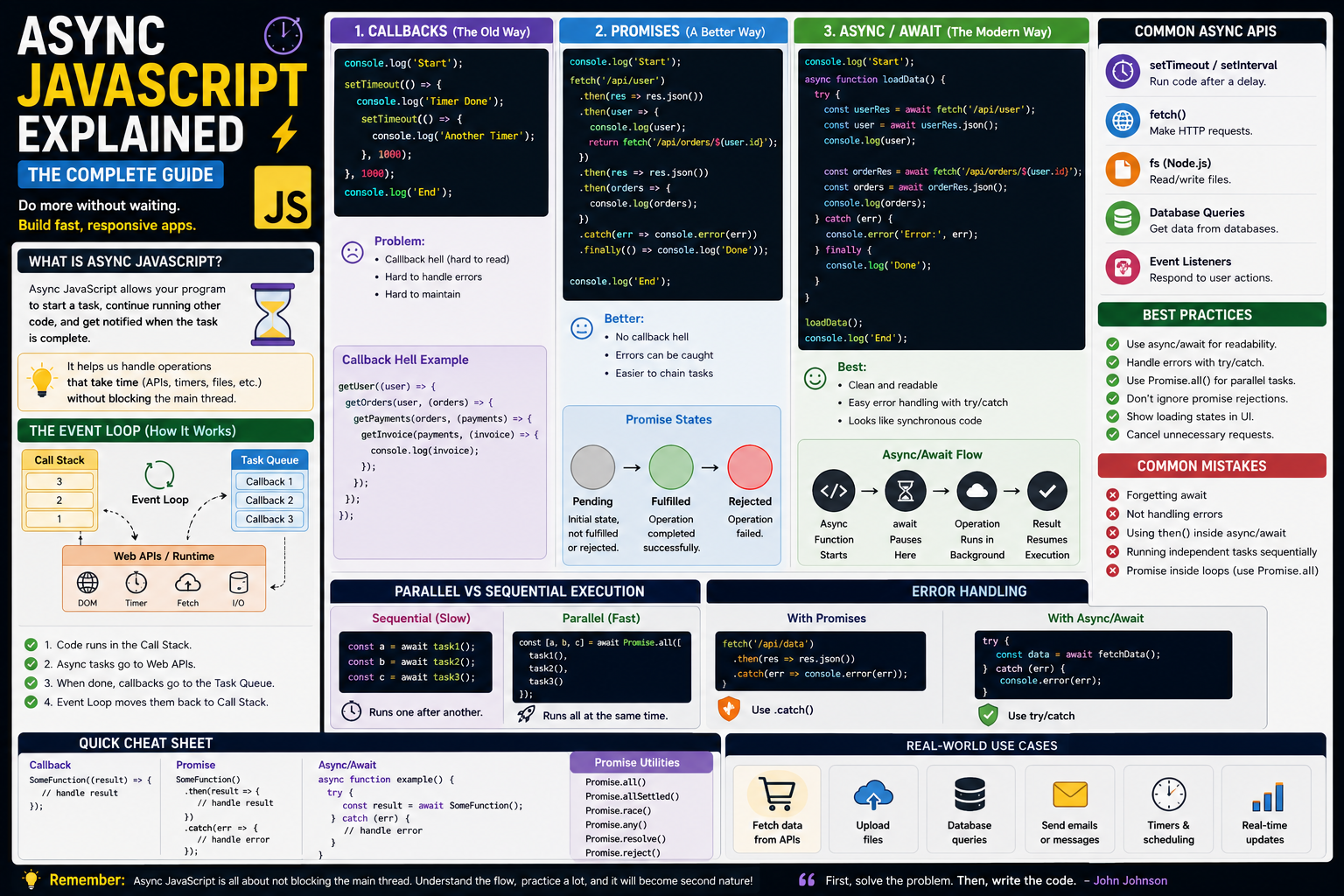
Async JavaScript Explained
JavaScript is often described as a single-threaded programming language.
That can make one question confusing:
How can JavaScript handle multiple things at the same time?
How can a website fetch data from an API while the user continues clicking buttons?
How can a timer wait for two seconds without freezing the entire page?
How can an application download data while still responding to user interactions?
The answer is asynchronous JavaScript.
Async JavaScript allows your application to start an operation that may take some time and continue doing other work instead of waiting for that operation to finish.
Once you understand the basic concepts, asynchronous JavaScript becomes much easier.
Let's break it down step by step.
What Is Synchronous JavaScript?
Synchronous code runs one operation after another.
For example:
console.log("First");
console.log("Second");
console.log("Third");
The output is:
First
Second
Third
JavaScript executes each statement in order.
The second statement waits for the first one to finish.
The third waits for the second.
This is simple and predictable.
What Is Asynchronous JavaScript?
Asynchronous code allows JavaScript to start an operation and continue executing other code while waiting for the result.
For example:
console.log("Start");

setTimeout(() => {
  console.log("Finished");
}, 2000);

console.log("End");
The output is:
Start
End
Finished
The timer takes two seconds, but JavaScript doesn't stop everything during those two seconds.
It continues running the rest of the code.
That's the basic idea behind asynchronous programming.
Why Do We Need Async JavaScript?
Many operations take time.
For example:
Fetching data from an API
Reading files
Sending data to a server
Database queries
Waiting for a timer
Loading images
Uploading files
User interactions
If JavaScript waited for every operation to finish before doing anything else, modern web applications would feel extremely slow.
Asynchronous programming prevents that problem.
JavaScript Is Single-Threaded
JavaScript traditionally executes code using a single main thread.
That means it doesn't simply execute two pieces of JavaScript code simultaneously on that thread.
Instead, the JavaScript runtime works with the browser or Node.js environment to handle operations that take time.
The runtime can start an asynchronous operation, continue executing JavaScript, and later process the result.
This is where the event loop becomes important.
Understanding the Event Loop
The event loop is one of the most important concepts in JavaScript.
A simplified version looks like this:
JavaScript Code
      ↓
Call Stack
      ↓
Web APIs / Runtime
      ↓
Task Queues
      ↓
Event Loop
      ↓
Call Stack
The call stack executes JavaScript.
The surrounding runtime handles certain asynchronous operations.
When an asynchronous operation is ready, its callback can be placed into an appropriate queue.
The event loop helps determine when queued work can be processed.
You don't need to memorize the entire runtime architecture immediately.
Just remember:
JavaScript can start asynchronous work without blocking the main execution flow.
Callbacks
Callbacks were one of the earliest common ways to handle asynchronous operations in JavaScript.
A callback is a function passed to another function so it can be called later.
Example:
setTimeout(() => {
  console.log("Finished!");
}, 2000);
The function passed to setTimeout() is a callback.
It runs later.
The Problem With Callback Hell
Callbacks work, but deeply nested callbacks can become difficult to maintain.
For example:
getUser((user) => {
  getOrders(user, (orders) => {
    getPayments(orders, (payments) => {
      getHistory(payments, (history) => {
        console.log(history);
      });
    });
  });
});
This is often called callback hell.
The code becomes:
Difficult to read
Difficult to debug
Difficult to modify
Difficult to handle errors in
Promises were introduced to make asynchronous code easier to manage.
What Is a Promise?
A Promise represents the eventual result of an asynchronous operation.
A Promise can be in states such as:
Pending
Fulfilled
Rejected
Example:
const promise = fetch("/api/users");The request doesn't immediately contain the final response.
Instead, fetch() returns a Promise.
You can handle the result with .then().
fetch("/api/users")
  .then((response) => response.json())
  .then((data) => {
    console.log(data);
  });
Handling Promise Errors
Promises can also be handled with .catch().
fetch("/api/users")
  .then((response) => response.json())
  .then((data) => {
    console.log(data);
  })
  .catch((error) => {
    console.error(error);
  });
If something goes wrong, the error can be handled by the catch block.
Promise Chaining
Promises can be chained together.
fetch("/api/users")
  .then((response) => response.json())
  .then((users) => {
    return users.filter((user) => user.active);
  })
  .then((activeUsers) => {
    console.log(activeUsers);
  });
Each .then() receives the result from the previous operation.
This is much cleaner than deeply nested callbacks.
Async Functions
The async keyword allows you to create an asynchronous function.
async function getUsers() {
  // asynchronous code
}
An async function always returns a Promise.
For example:
async function greet() {
  return "Hello";
}
You can handle the returned Promise with:
greet().then((message) => {
  console.log(message);
});
Await
The await keyword makes asynchronous code easier to read.
Example:
async function getUsers() {
  const response = await fetch("/api/users");

  const users = await response.json();

  console.log(users);
}
This looks almost like synchronous code.
But the function is still asynchronous.
Async/Await Is Not Blocking the Browser
This is a common misunderstanding.
When you write:
const response = await fetch("/api/users");it does not mean the entire JavaScript application freezes until the request finishes.
The async function pauses at that point while the asynchronous operation continues.
Other work can continue.
Once the Promise settles, the function resumes.
Handling Errors With Try/Catch
One of the biggest advantages of async/await is clean error handling.
async function getUsers() {
  try {
    const response = await fetch("/api/users");

    const users = await response.json();

    return users;
  } catch (error) {
    console.error("Failed to load users:", error);
  }
}
This is often easier to understand than a long Promise chain.
Always Check HTTP Errors
A common mistake with fetch() is assuming that a failed HTTP request automatically throws an error.
It doesn't.
For example:
const response = await fetch("/api/users");A response with a status such as 404 or 500 still produces a Response object.
Check the status:
if (!response.ok) {
  throw new Error("Request failed");
}
A more complete example:
async function getUsers() {
  const response = await fetch("/api/users");

  if (!response.ok) {
    throw new Error("Failed to fetch users");
  }

  return response.json();
}
This is an important habit when working with APIs.
Running Multiple Requests Together
Suppose you need users and products.
You could write:
const users = await getUsers();
const products = await getProducts();
The second request waits for the first one.
If they are independent, this may be unnecessarily slow.
Use Promise.all():
const [users, products] = await Promise.all([
  getUsers(),
  getProducts(),
]);
Now both operations can run concurrently.
This is one of the most useful async JavaScript techniques.
Promise.allSettled()
Sometimes you want every operation to finish even if one fails.
Use:
const results = await Promise.allSettled([
  getUsers(),
  getProducts(),
  getOrders(),
]);
Each result tells you whether the operation fulfilled or rejected.
This is useful when individual failures shouldn't stop the entire operation.
Promise.race()
Promise.race() resolves or rejects when the first Promise settles.
const result = await Promise.race([
  request(),
  timeout(),
]);
This can be useful when implementing time limits.
Promise.any()
Promise.any() resolves when the first Promise successfully fulfills.
const result = await Promise.any([
  requestFromServerOne(),
  requestFromServerTwo(),
  requestFromServerThree(),
]);
If one request succeeds, you can use that result.
Don't Await Independent Operations Sequentially
This pattern:
const profile = await getProfile();
const settings = await getSettings();
const notifications = await getNotifications();
may be slower than necessary if the requests don't depend on each other.
Instead:
const [profile, settings, notifications] = await Promise.all([
  getProfile(),
  getSettings(),
  getNotifications(),
]);
Think carefully about whether operations actually depend on each other.
When Sequential Execution Is Correct
Sometimes one operation depends on another.
For example:
const user = await getUser();

const orders = await getOrders(user.id);
Here, the second request needs the user's ID.
Running both requests simultaneously would not make sense.
The rule is simple:
Parallelize independent operations. Keep dependent operations sequential.
Async JavaScript in React
Modern React applications use asynchronous operations constantly.
For example, data may come from:
APIs
Databases
Server actions
External services
A component might trigger a request and update its state when the result arrives.
The important thing is to understand that asynchronous operations don't instantly return their final data.
You must properly handle:
Loading
Success
Error
Empty states
Loading States Matter
When data is being fetched, users should know something is happening.
For example:
if (loading) {
  return <p>Loading...</p>;
}
Without a loading state, users may think the application is broken.
Error States Matter Too
If an API fails, don't leave the user staring at an empty screen.
Instead:
if (error) {
  return <p>Something went wrong. Please try again.</p>;
}
Good asynchronous UX includes both loading and error states.
Async JavaScript in Node.js
Async programming is just as important on the server.
Node.js applications frequently perform:
Database queries
File operations
API requests
Authentication
Email delivery
Payment operations
Example:
async function getCustomers() {
  const customers = await db.customer.findMany();

  return customers;
}
Without asynchronous programming, server applications would spend too much time waiting for I/O operations.
Don't Forget to Return Promises
Consider:
async function getUser() {
  fetch("/api/user");
}
The function doesn't return the fetch Promise.
Better:
async function getUser() {
  return fetch("/api/user");
}
Or:
async function getUser() {
  const response = await fetch("/api/user");

  return response.json();
}
Returning the result makes the function useful to callers.
Avoid Unnecessary await
This:
async function getUsers() {
  return await fetchUsers();
}
is often unnecessary if you don't need to handle the result inside the function.
You can usually write:
async function getUsers() {
  return fetchUsers();
}
However, await can still be useful when you need local error handling or need to transform the result.
Don't Forget try/catch
Whenever an asynchronous operation can fail, think about how the failure should be handled.
For example:
try {
  const data = await fetchData();

  return data;
} catch (error) {
  console.error(error);

  throw error;
}
The correct error-handling strategy depends on the application.
The important thing is not to ignore failures.
Race Conditions
Asynchronous operations can finish in an unexpected order.
Imagine a search box.
The user types:
JavaScriptThen quickly changes it to:
JavaScript tutorialThe second request might finish first.
If the older request finishes afterward and updates the screen, the application could display outdated results.
This is a race condition.
Applications that perform frequent asynchronous requests need to consider this possibility.
AbortController
AbortController can cancel certain operations such as fetch requests.
Example:
const controller = new AbortController();

fetch("/api/users", {
  signal: controller.signal,
});

controller.abort();
This can be useful when a request is no longer needed.
For example, search requests can be cancelled when the user changes the search term.
Async JavaScript and Performance
Asynchronous programming doesn't automatically make every application faster.
The goal is to avoid unnecessary waiting.
Good practices include:
Run independent operations concurrently.
Avoid unnecessary network requests.
Cache data when appropriate.
Cancel requests that are no longer needed.
Don't perform expensive work unnecessarily.
Handle loading states properly.
The best async code is not simply "more asynchronous."
It's code that uses waiting efficiently.
Common Async JavaScript Mistakes
Beginners commonly make mistakes such as:
Forgetting
awaitForgetting to return a Promise
Ignoring errors
Treating a Promise like its final value
Running independent requests sequentially
Forgetting loading states
Assuming
fetch()throws on HTTP errorsCreating race conditions
Nesting unnecessary callbacks
Understanding these problems will make debugging much easier.
A Simple Mental Model
When working with asynchronous JavaScript, think about three questions:
What am I waiting for?
Maybe it's an API request, database query, timer, or file operation.
Can I do something else while waiting?
If yes, asynchronous execution is useful.
What should happen when it finishes?
You need to handle success, failure, or both.
This mental model makes async code much easier to reason about.
The Async JavaScript Workflow
A typical API operation might look like this:
Start request
     ↓
Promise created
     ↓
Application continues
     ↓
Request finishes
     ↓
Promise settles
     ↓
await resumes
     ↓
Process result
     ↓
Update application
Once this flow becomes familiar, asynchronous JavaScript stops feeling mysterious.
What You Should Learn First
If you're learning asynchronous JavaScript, focus on these concepts in order:
Synchronous vs asynchronous code
Callbacks
Promises
.then()and.catch()asyncawaittry/catchPromise.all()The event loop
Request cancellation and race conditions
You don't need to master everything at once.
Build small examples and gradually increase the complexity.
Final Thoughts
Asynchronous JavaScript is one of the most important concepts in modern web development.
At first, Promises, async/await, and the event loop can feel confusing.
But the core idea is simple:
Don't make the entire application wait unnecessarily for slow operations.
Start asynchronous work, allow other tasks to continue, and handle the result when it becomes available.
Once you understand callbacks, Promises, async/await, and the event loop, you'll be able to work confidently with APIs, databases, React, Node.js, and modern web applications.
Async JavaScript isn't something you simply memorize.
The more real applications you build, the more naturally it will make sense.
Keep reading
Related Posts

Career & Technology
The Most Valuable Skills to Learn in the AI Era (2026 and Beyond)
Artificial Intelligence is changing how we work, learn, and build products. Some skills are becoming less valuable, while others are becoming more important than ever. If you want to stay relevant and thrive in 2026 and beyond, these are the skills you should focus on developing.
4 min read · 330 views

Programming
Vibe Coding vs Learning to Code: Which Path Will Take You Further?
AI can build apps faster than ever, leading to the rise of "vibe coding." But does that mean learning to code is no longer necessary? Let's explore the strengths, weaknesses, and future of both approaches to discover which path offers the greatest long-term value.
4 min read · 276 views
Next.js
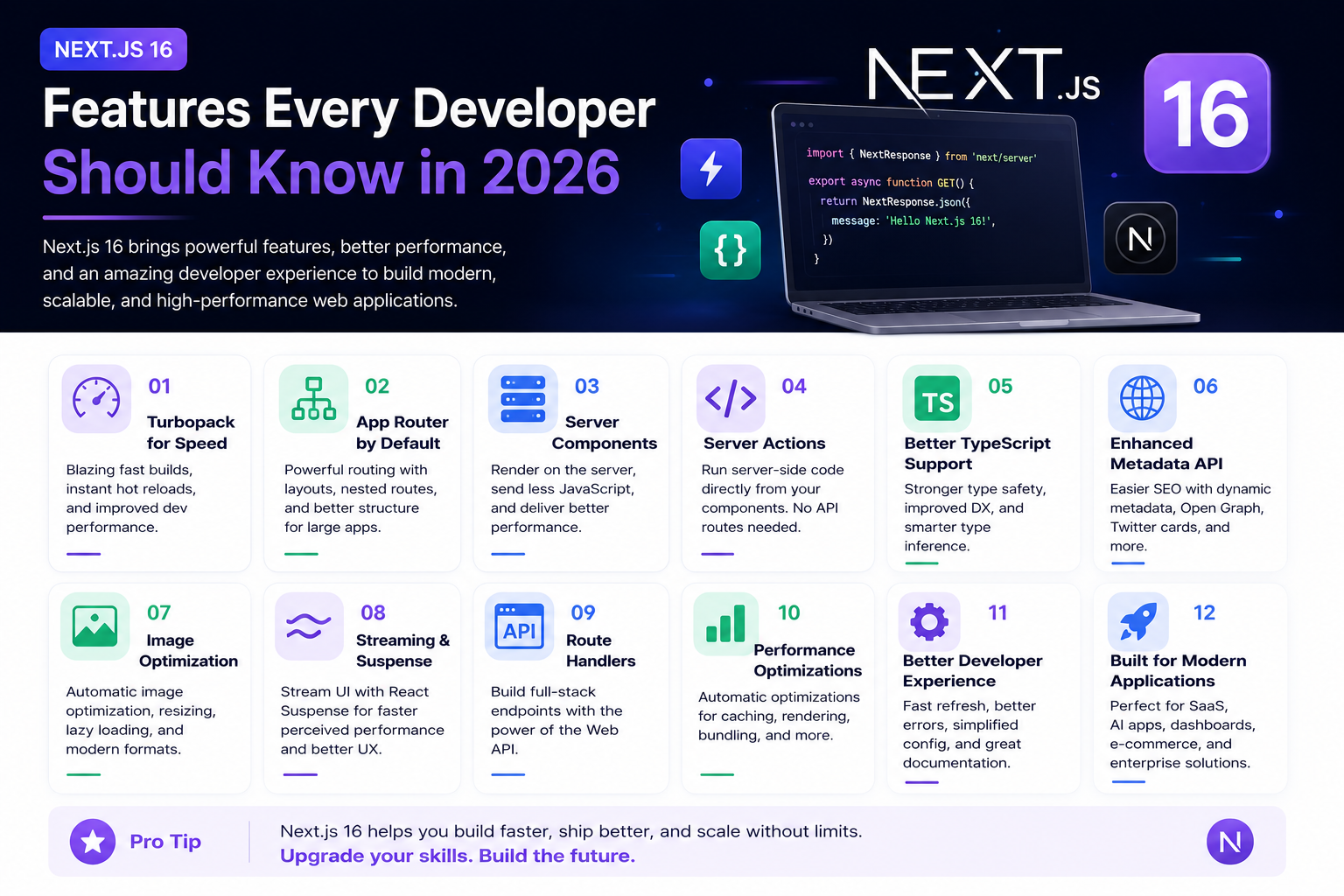
Next.js 16 Features Every Developer Should Know in 2026
Next.js 16 continues to push modern web development forward with improved performance, better developer experience, enhanced routing, and powerful server-side capabilities. Whether you're building a blog, SaaS platform, portfolio, or enterprise application, these are the most important Next.js 16 features every developer should understand.
4 min read · 191 views
Trending
Popular Posts
Productivity Tools That Save Developers Hours in 2026
680 views
The Most Valuable Skills to Learn in the AI Era (2026 and Beyond)
330 views
Vibe Coding vs Learning to Code: Which Path Will Take You Further?
276 views
Next.js 16 Features Every Developer Should Know in 2026
191 views
The Best Folder Structure for Next.js Projects in 2026
151 views
Comments
No approved comments yet.